|
<< Click to Display Table of Contents >> Maps and animated paths |
  
|
|
<< Click to Display Table of Contents >> Maps and animated paths |
|
In the Toolbox under the objects tab, you will find the route animation field. There you will find a selection of various objects.
This is also possible with the help of GPX paths or with the help of photos or videos that contain GPS metadata. This data is used to map the route on a suitable map section.
In the Toolbox you will find the Route animations section under the Objects tab. Various objects are available for selection there.
Simple path |
Adds a simple path whose color and width can be changed. |
Decorated path |
Adds a path whose appearance can be greatly influenced. You can select vehicles that appear at the top. |
Map |
Adds a map that is selected in the Map Wizard. |
Map animation |
Add a chapter, in whose first track you will find one of your selected maps. In the second track is a path that can be placed anywhere. |
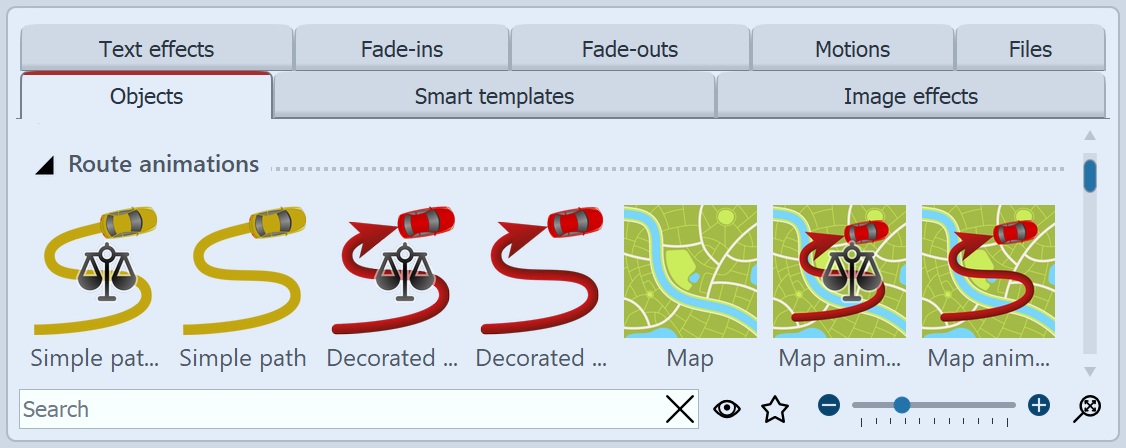 Route animation in the toolbox To use the respective object, drag it from the Toolbox into the Timeline. With the object map and the map animation the Map Wizard opens following.
|
|
The available maps are provided by OpenStreetMap. Depending on server load, loading the map material may be delayed or carried out incompletely. Then try again at a later time. |