Camera Pans


|
Camera Pans |
|
|
Pans over your images produce real special effects. This way AquaSoft ® SlideShow XP five & Studio allows you to make even more off your slide show. You can present your panoramas impressively. As for the zoom, movement paths are used for this effect.
The following objects support camera pans:
Tools:
The necessary tools can be found in the layout designer.
Sets the time of a movement path.
Loads a saved movement path.
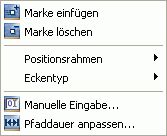
Through a right click on a movement mark you can open another menu.
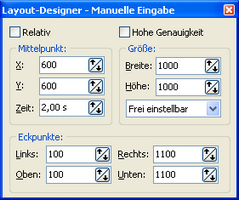
You can also set the coordinates for each movement mark manually. Use the "Custom entry..." you can find in the above menu.
Please also note the camera pan tutorial:
|
| Copyright © AquaSoft ® 1999-2007 www.aquasoft.de |
 Image with Effects




 Saves a movement path.