CD Wizard


|
CD Wizard |
|
|
A slide show can consist of different files. This includes images and music files. These files aren't saved in the slide show, but only as links to the data. If you move or rename files, AquaSoft ® SlideShow XP five & Studio cannot find the files anymore and the show cannot play.
The CD Wizard helps you to burn or archive your slides shows with all their data to a data CD/DVD.
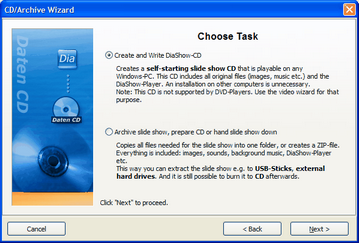
Through "Wizards" / "CD/Archive Wizard" you can open it.
Click "Next" after choosing a task.
Creating and burning a slide show CD:
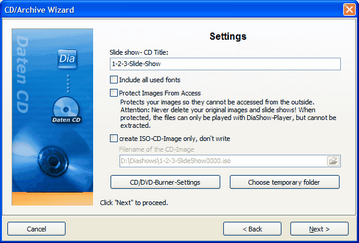
Enter a title for the CD/DVD. This title will be used as the name for the CD/DVD.
Should you have used fonts in the design of your slide show, that might not be installed on all computers you can burn those to the CD/DVD.
Protect images from access: If you want to hand the CD/DVD on, but don't want to allow access to your images, you can protect them. This function is not useful for archiving, because the show cannot be edited later on. It can only be played. Restoring the images is not possible afterwards. You should not delete your original images from your hard drive, if you select this option.
If you want to create an ISO-Image, choose this option. The show will not be burned after this decision.
Click "Next" and your chosen process will be started.
Archive slide show, prepare CD or hand slide show down
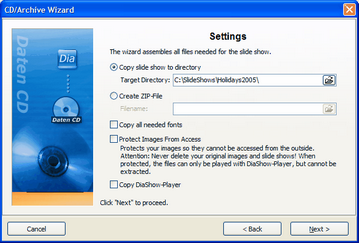
This option allows you to save all data (ads-file, images, music) in one single directory. This is very useful for archiving. This way, you can easily save your slide show on an external medium (hard drives, USB-Stick...).
You can pack all files into a zip-archive to save space.
Should you have used fonts in the design of your slide show, that might not be installed on all computers you can copy those, too.
Protect images from access: If you want to hand the CD/DVD on, but don't want to allow access to your images, you can protect them. This function is not useful for archiving, because the show cannot be edited later on. It can only be played. Restoring the images is not possible afterwards. You should not delete your original images from your hard drive, if you select this option.
You should also copy the AquaSoft ® SlideShow XP five & Studio-Player to be able to play the slide show on PCs that don't have the AquaSoft ® SlideShow XP five & Studio installed. Otherwise, without this player, the show cannot play.
Click "Next" and then "Start". Now all files needed for the show will be copied to a chosen folder or collected in a zip-archive.
|
| Copyright © AquaSoft ® 1999-2007 www.aquasoft.de |