Video Wizard


|
Video Wizard |
|
|
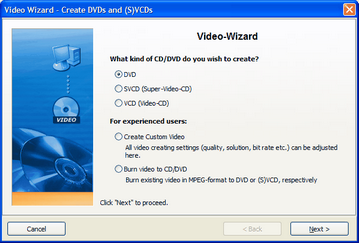
To present your slide show on a TV you can create a CD/DVD for the DVD-Player using the video wizard. You can access it through "Wizards" / "Video Wizard".
Create CD/DVD:
Video-DVD Creates an MPEG 2 - Video and burns it as a Video DVD to a DVD. Solution: 720x576
Video-SVCD Creates an MPEG 2 - Video and burns it as VCD to a CD. Solution: 480x576
Video-VCD: Creates an MPEG 1 - Video and burns it as VCD to a CD. Solution: 352x288
Wether your DVD-player supports VCD and SVCD, you can find in your player's manual.
After choosing the CD/DVD-option click "Next".
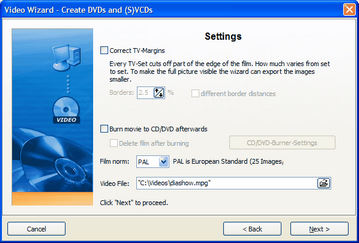
If you want to burn the video afterwards, set the check at "Burn movie to CD/DVD afterwards".
The standard for movies in Europe is PAL. Alternatively you can switch to "NTSC", the American movie standard.
In "Video File" you enter the folder on the hard drive where the video is supposed to be saved in. Even if the video is to be burned to a CD/DVD it has to be saved to the hard drive first. Please always enter the filename as "name.mpg".
Click "Next" and then "Create Video". Please note that converting a show into a video can take several minutes/hours. This depends on the length of your show, the size of your images and the power of your PC.
Create user defined video (only for experienced users):
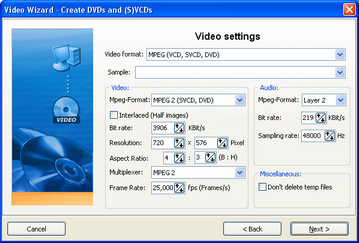
Choose "Create Custom Video" if you want to change settings for the video creation. Please note that changing standard settings may cause a player to refuse playing the video.
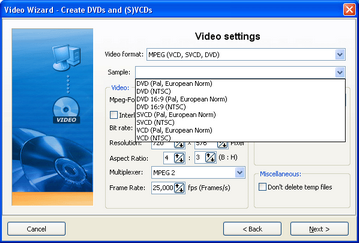
Choose a preset: VCD, SVCD or DVD.
According to the preset the standard video file settings are chosen. You should only change these settings, when you are sure that the player (or software player) supports the changed values.
Click "Next" after choosing the preset.
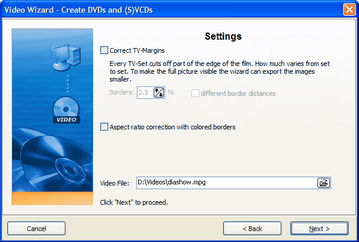
When you have to take borders into account because of your TV, set them here. Enter a directory on your hard drive that the video can be saved to. Please always enter the filename as "name.mpg".
Click "Next" and then "Create Video". This process can take several minutes/hours. This depends on the length of your show, the size of your images and the power of your PC.
Burn video to CD/DVD:
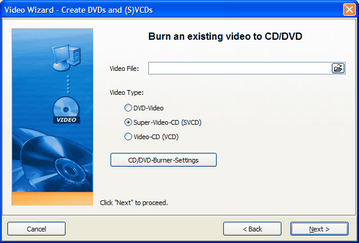
This can be sued to burn a video that has already been saved to the hard drive, to a CD/DVD.
Enter the right mpg-file and choose the video type it is in.
Note: Should you encounter problems replaying a burned VCD/SVCD/DVD on your DVD-player, it might help to lower the burning speed in the CD/DVD-burner-settings and/or change the brand of you blank CD/DVD. |
| Copyright © AquaSoft ® 1999-2007 www.aquasoft.de |