Import Wizard


|
Import Wizard |
|
|
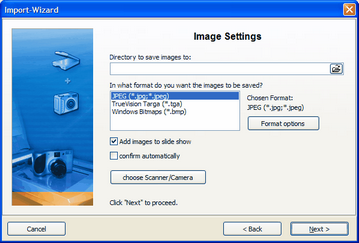
This wizard can be used to import images from a scanner or a digital camera, provided that the devices are accessible through the TWAIN32-interface. The images are saved and added to the object list. They can be adjusted now or later with the image editing tool.
Open the wizard through "Wizards" / "Import Wizard".
Enter a target directory for the images. Choose the desired file format and set format options if necessary.
Are the images to be directly added to the object list, activate this function.
Then choose the scanner or digital camera.
Click "Next" and then "Start". Your images will now be imported. |
| Copyright © AquaSoft ® 1999-2007 www.aquasoft.de |