|
SlideShow-Manager allows you to become creative yourself and design own templates for your menus. To do this use the integrated Template Editor.
| 1. | To create a new template click on the "New template" button in the template catalog.
To edit an existing template select the template you want to edit and click the "Edit template" button.

|
| 2. | Design the template with the help of the editor.
|
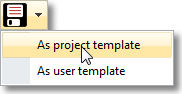
| 3. | Save the template by clicking the  button. You will be asked to specify a file name if you've created a new template or have edited one of the templates that came with the product. button. You will be asked to specify a file name if you've created a new template or have edited one of the templates that came with the product.
Type a name and click "OK". Your template will then be saved as project template.
You can also save your template directly as project or user template by clicking on the arrow right of the button and selecting the saving option of your choice:
|
|


