Overview


|
Overview |
|
|
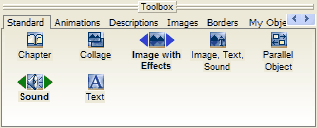
The toolbox contains a large number of different objects to design your slide show. Simply click on the desired object to add it to the end of the show. Through clicking and moving the object with the left mouse button pressed, you can add the object at any point in the image list, the story board or the timeline. This process is called Drag&Drop.
The difference between "Image with Effects" and "Image, Text, Sound"- object
Images can be added either as "Image with Effects" or as "Image, Text, Sound" objects. Here the specific use decides.
Image with Effects:
An image added as "Image with Effects" can be animated through movement paths and zooms. But it doesn't support individual text and sound. This doesn't affect the background music.
"Image, Text, Sound" - Object
An image added as "Image, Text, Sound"- object can be combined with individual text and sound. These images cannot be animated with movement paths or zooms.
On standard setting, images added over the plus-symbol are "Image, Text, Sound"- objects. This is indicated by the two blue triangles next to the "Image, Text, Sound"- object in the toolbox. If you rather want to add images as "Image with Effects" through the plus symbol, click on the "Image with Effects" in the toolbox with the right mouse button and choose "As standard for image files". The two blue triangles appear next to the "Image with Effects".
Collage:
The collage allows you to present several images at once.
Chapter:
A slide show sometimes contains a very large number of images. Here it is useful to divide the slide show into chapters, so that you don't lose your overview. These chapters are solely for keeping order and are of no consequence to the course of the slide show.
Parallel Object:
The parallel object can be used for picture-in-picture effects and adjusting music. As the name suggests, objects will be shown at the same time, or parallel.
Sound:
The sound object allows you to insert sounds, speech and music in addition to the background music.
Text:
With the text object you can show texts, animate them with great variety and use many effects. This makes it possible to e.g. let text roll or crawl through the image.
|
| Copyright © AquaSoft ® 1999-2007 www.aquasoft.de |