Program Overview


|
Program Overview |
|
|
AquaSoft ® SlideShow XP five & Studio includes many tools to edit your show. In the following picture you find an overview over the individual controls. We will often talk of objects. Objects are all elements that can be used in a slide show, e.g. images, texts, music and collages.
The Menu Bar:
The Image List:
The image list shows all objects of your current slide show. In addition you can see the time when the object will be shown under "Start time". Under "Duration" you see the time that the image will remain on the screen. In the case shown all images are visible for 5 seconds.
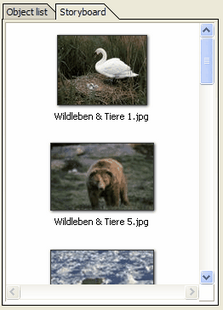
Here you can switch to the storyboard. It shows a small preview picture, called thumbnail, for each of your images. When you are working with large slide shows, this makes it easier to find a certain image.
The Layout Designer:
The layout designer is your preview window. Here you see how images and texts will be shown on screen. The
You can use the 8 points around the image to resize it. The frame is called "position frame". You will need this feature especially for picture-in-picture effects and for collages.
Via the
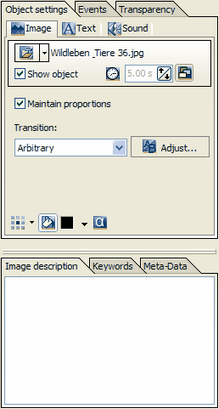
The Object Settings:
Every object has certain properties. Here the properties of an image ("Image, Text, Sound" - object) are shown. Each setting will be explained later on.
Here you can set for example the duration of your image and the kind of transition. In the image description you can enter text that can be edited in "Text". In "Sound" you can add a special comment or sound to your image.
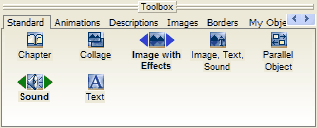
The Toolbox:
In the toolbox you find all objects that can be used in a slide show. Through clicking and moving the object with the left mouse button pressed, you can add the object at any point in the image list. This process is called Drag&Drop. A simple click on the object adds it to the end of the slide show.
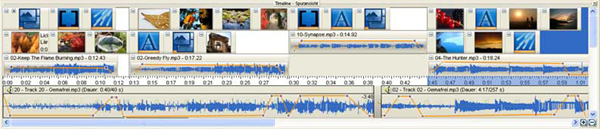
The Timeline:
The timeline visualizes the chronological order of your slide show and all the images, texts, sounds, and music contained.
|
| Copyright © AquaSoft ® 1999-2007 www.aquasoft.de |


 Creates a new empty slide show.
 Opens an existing slide show.
 Saves your slide show.
 Opens the slide show settings.
 Loads the background music settings (adding and removing song titles).
 Adds all images from one directory.
 Removes selected images from the slide show.
 Cuts selected images from your slide show and puts them in the clipboard.
 Copies selected images from your slide show and saves them in the clipboard.
 Adds images from the clipboard to the slide show.
 Undoes the last change.
 Plays the slide show from the selected object.
 Switches to the Timeline-View.
 Switches to the Layout-View.
 Switches to the Storyboard-View.
 Switches to the Image List-View.
 Renames the file that belongs to the selected object (Image-/Music files will also be renamed on the hard drive!).
 Shows the selected image in original size or plays the selected song.
 Opens the image editor for the selected picture.
 Sends the selected object via eMail.
 Opens the selected object in the assigned application (Windows-Settings).
 Sets the selected image as background on your desktop.
 Searches for certain keywords in one or more slide shows (you can add keywords to images).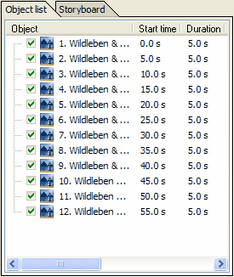
 enlarged the preview. The
  makes the preview smaller. The
  returns the preview to the standard view / window size.
 you can turn on a grid to align images magnetically. Furthermore